
1. What is the Angle System?
The Angle System in SmoothTool is a powerful tool that lets you define the work and travel angles of the welding torch for your welds—ensuring optimal arc control, penetration, and bead shape. Rather than manually adjusting the tool orientation for every path point, the Angle System allows you to focus on positioning, and then apply your desired angles in a clear and consistent way afterward.
Correct angles are essential for achieving high-quality, repeatable welds—and this feature makes getting them right much easier.
2. Core Functionality
- 🎯 Set desired work and travel angles for the entire weld or for individual segments
- 🧠 Automatically applies torch angles based on your defined values
- 🔄 Separate control of start and end angles (introduced in SmoothTool 1.13)
- Ideal for tight spaces or limited torch access at the beginning or end of a weld
- ✅ Enable/disable angle system per weld node with a simple checkbox
- 🧩 Seamlessly integrates with your existing weld path and program structure
3. Key Benefits
- 📐 Improves weld quality – ensuring consistent and correct angle throughout the weld
- ⏱️ Speeds up teaching – focus on torch position first, then apply angles later
- 🎯 Better access in tight spaces – set different start/end angles for hard-to-reach areas
- 🤖 Reduces human error – angle control is programmatic and repeatable
- 💡 Enables optimal torch orientation for different welding techniques and positions
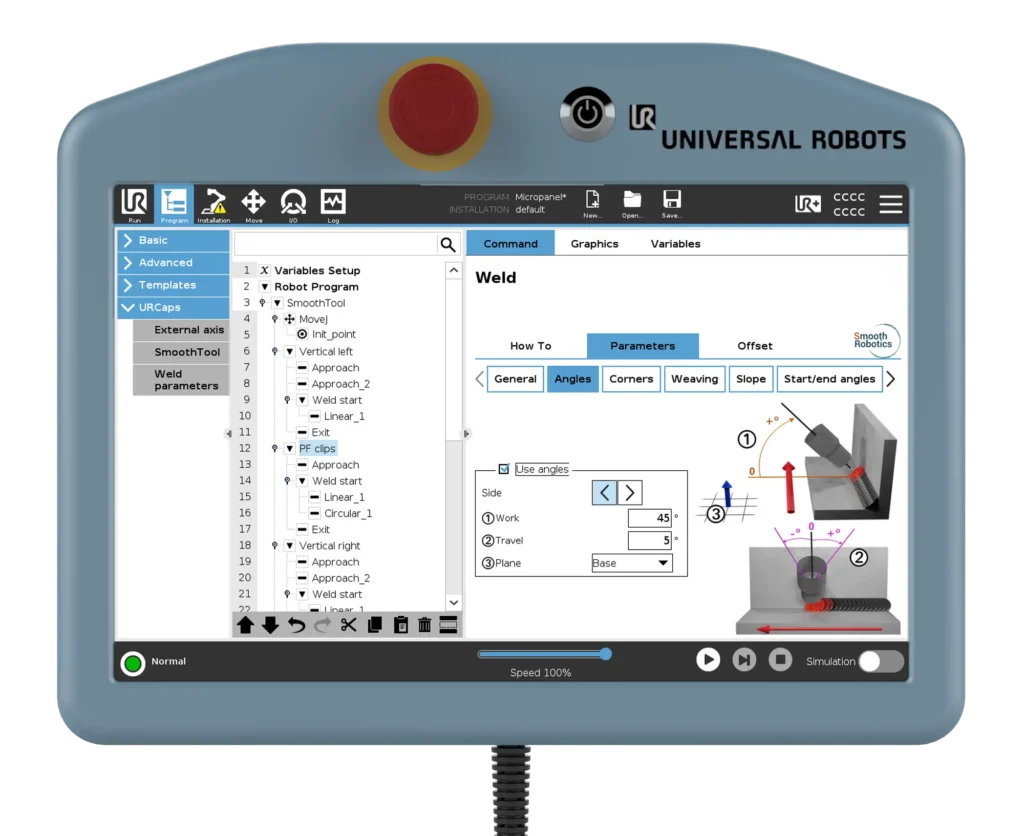
4. Use Case Example
A welder is programming a fillet weld inside a narrow corner. The start of the weld requires the torch to enter at a sharp angle due to space constraints, but once inside, the ideal work angle is more open. With SmoothTool’s Angle System, the welder sets a specific start angle for the tight entry and a standard angle for the rest of the weld—ensuring full arc coverage from start to finish, without having to manually adjust every point.
5. Pro Tips & Best Practices
- Use the start/end angle feature when welding into or out of tight corners
- Always double-check that the checkbox labeled “Use Angles” is enabled for the weld node
- Combine with the 3D Universe for better visualization of how torch angles affect the path
6. How to Access This Feature in SmoothTool
Open the Angles tab inside any weld node to configure the work and travel angles.
- To enable the feature, check the box labeled “Use Angles”
- You can apply angles globally to the entire weld, or set different values for individual segments
- In SmoothTool 1.13 and newer, you can also define start and end angles for more complex welds
7. Why It Matters
The Angle System gives you greater control, better consistency, and higher-quality welds—all while making programming faster and easier. By separating path position from torch orientation, it removes one of the biggest friction points in cobot welding.
👉 Want help dialing in the perfect torch angle for your welds? Schedule a quick session with our team and we’ll guide you through it.