
1. What is the 3D Universe?
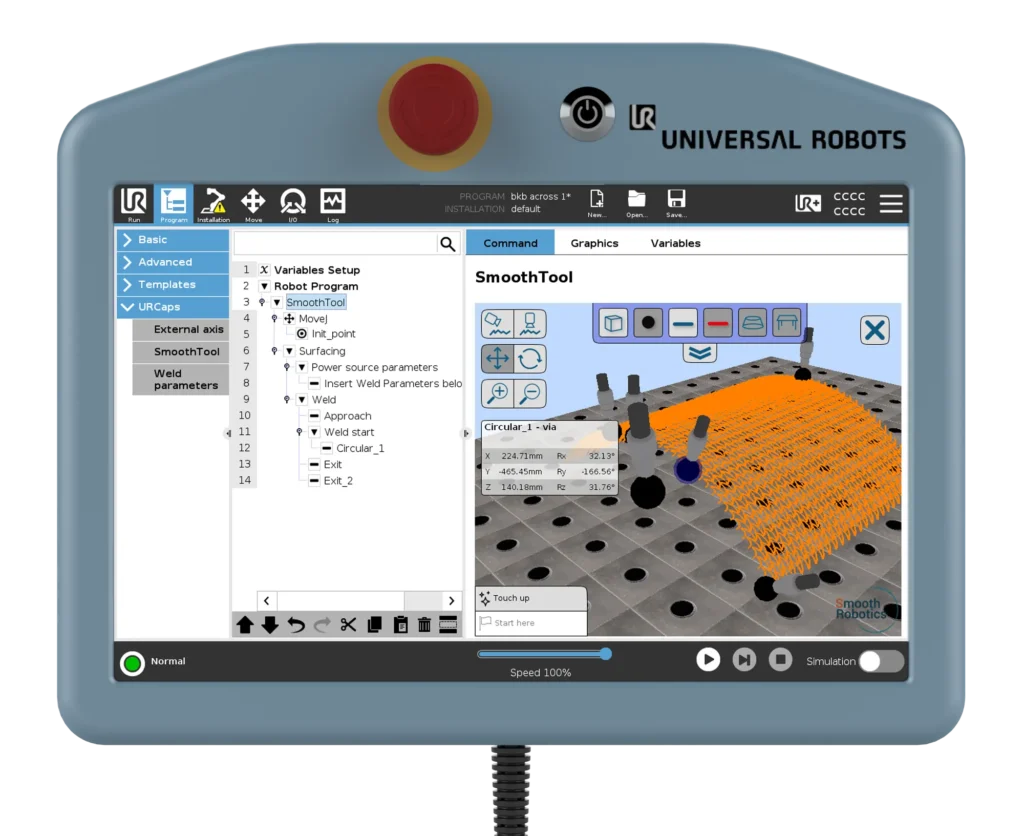
The 3D Universe in SmoothTool is a powerful visualization and interaction tool that gives you a clear, three-dimensional overview of your welding program. Whether you’re setting up a single weld path or working on a complex multi-pass job, the 3D Universe lets you see your robot’s path in context—including optional elements like the robot base and your welding table—so you can better understand how everything fits together in space.
But it’s more than just a viewer. The 3D Universe also lets you interact with your program directly, speeding up troubleshooting, improving accuracy, and reducing the need for repeated dry runs.
2. Core Functionality
- 🔧 Visualize full or partial weld programs in a 3D workspace
- 🧱 Insert robot base and/or welding table with accurate dimensions and positioning
- 🎯 Click on any point in the path to view detailed data
- 🛠️ Move or rotate individual path points directly in 3D
- 🔁 Start program execution from any selected point in the 3D view
- 👁️ Toggle elements on/off, such as points, paths, robot base and welding table
- 🕹️ View controls include:
- Two preset quick views
- Free move, rotate, zoom in/out
- Switch between global and local views
3. Key Benefits
- 🧠 Instant spatial overview – Greatly improves your understanding of the robot’s movement and weld layout
- ⏱️ Saves time – Reduces the need for dry runs during program validation
- 🧭 Improves path accuracy – Quickly spot and adjust misaligned or unwanted points
- 🔄 Flexible troubleshooting – Jump to any path point without restarting the whole program
- 👨🏭 Optimized for real-world setups – Simulate and adapt to your actual welding environment
4. Use Case Example
Imagine you’re programming a complex surfacing job with several layers of overlapping welds across a large part. Instead of repeatedly running dry tests to check alignment, you open the 3D Universe to inspect the full path. You notice a weld start point is slightly off. With a few clicks, you adjust its position and rotation—right from the 3D view. You then jump directly to that point to test it, saving valuable time and minimizing downtime on the shop floor.
5. Pro Tips & Best Practices
- Use the global view to get the full picture of large programs, and local view for precision work on small sections.
- Toggle off unnecessary elements to reduce visual clutter and make troubleshooting faster.
- Don’t forget you can insert accurate robot base and table models—this is key to avoiding reachability issues in final setups.
6. How to Access This Feature in SmoothTool
The 3D Universe is available from the main SmoothTool node. If you’re using SmoothTool version 1.14 or newer, you’ll also find it in each weld node via the burger menu in the top right corner of the screen. That means it’s always close at hand when you need it most.
7. Why It Matters
The 3D Universe bridges the gap between programming and real-world welding. By making it easy to visualize and edit your weld path in context, it helps you work smarter, reduce trial-and-error, and increase confidence in your cobot setup.
👉 Want to see the 3D Universe in action? Contact our team for a live demo or trial.