
1. What is Touch Sense?
Touch Sense in SmoothTool is a smart, automated offset feature that helps your robot locate the actual position of your weld piece before starting the weld. It compensates for variations in placement or orientation—ensuring your welds are always accurate, even when parts aren’t perfectly aligned.
Touch Sense works by using the built-in force/torque sensor in Universal Robots’ cobots (e-series or newer), allowing the robot to physically detect reference surfaces using the gas cup. And because this system doesn’t rely on signals from the welding power source, it’s completely power source agnostic—meaning it works with any welding setup you’re using.
2. Core Functionality
- 📍 Detects the true position of your weld piece before welding
- 🤖 Uses the gas cup and internal force/torque sensor in the cobot to make physical contact
- 🔄 Applies an automatic offset to correct for any detected deviation
- 🔌 Power source independent – works with any type of welder
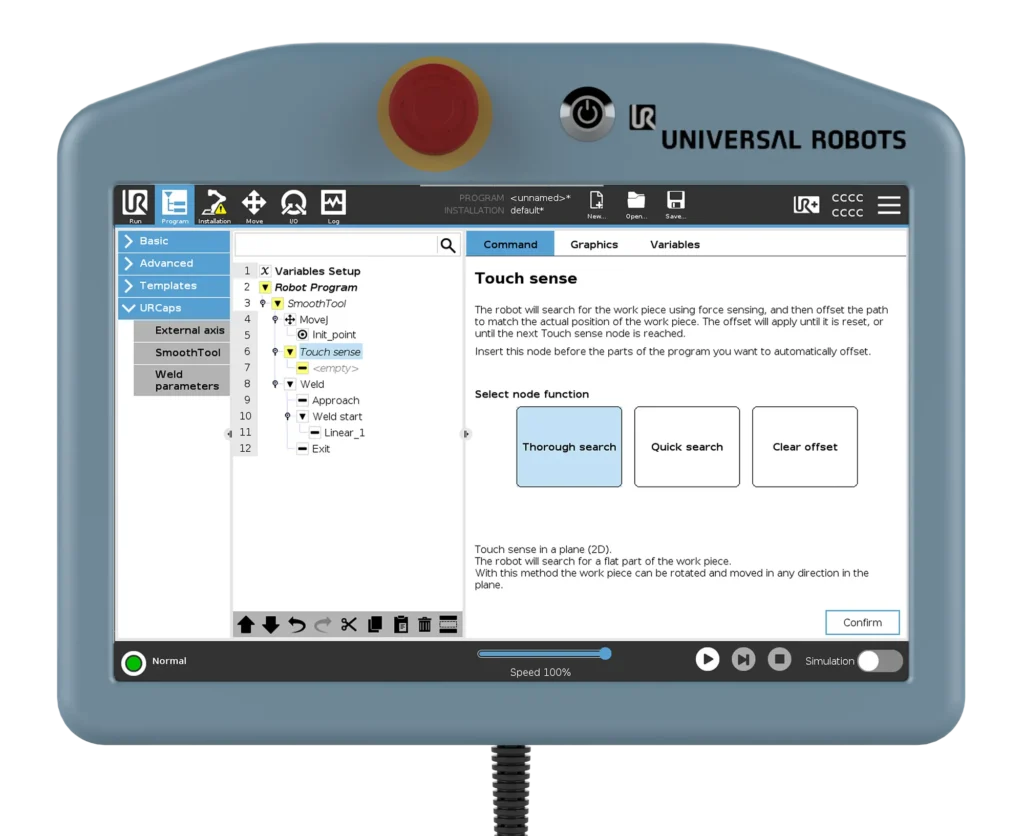
- 🎯 Three available search modes:
- Thorough Search (5-point): Maximum accuracy and robustness
- Quick Search (3-point): Faster, good for less demanding applications
- Clear Offset: Resets any previously applied offset
- 🔁 Offset applies to all nodes following the Touch Sense node
- 🚫 Automatic reset when multiple Touch Sense nodes are used consecutively
- 🧠 Supported only on e-Series and newer Universal Robots cobots (not CB series)
3. Key Benefits
- ✅ Improves weld accuracy – even when part placement isn’t perfect
- 🔧 Reduces dependency on high-precision fixtures
- 🌐 Works with any power source – no special integration required
- 🧩 Easy to integrate into existing programs
- ⏱️ Saves time – less manual alignment and fewer program variants
- 🔁 Fully automatic – no need for manual correction after sensing
4. Use Case Example
A production team is welding brackets onto large steel panels, but due to handling tolerances, the panels can shift slightly in the fixture. By inserting a Touch Sense node before the weld, the robot performs a quick surface search and adjusts the weld path accordingly. Because the feature works independently of the power source, the team doesn’t have to change anything in their welding setup or reconfigure external signals—Touch Sense just works.
5. Pro Tips & Best Practices
- Always use flat, straight surfaces as touch points for the most reliable results
- Thorough Search is ideal for high-precision welds or variable part positions
- Use Clear Offset when you need to cancel the adjustment and return to the original path
- Works only on e-Series cobots or newer (not supported on CB series)
- Use Touch Sense for position and orientation offsets—not for correcting part geometry or thickness
6. How to Access This Feature in SmoothTool
Touch Sense is available on the SmoothTool main node/screen as one of the templates to choose from.
Add it before your weld node to apply automatic offset correction. Choose between Thorough Search, Quick Search, or Clear Offset directly from the node’s interface.
7. Why It Matters
Touch Sense makes your welding cell smarter and more adaptable. And since it’s built entirely on the capabilities of the robot—without relying on your power source—it works with any welder, giving you full flexibility across setups. It reduces manual adjustment, lowers fixture costs, and delivers consistently accurate welds, every time.
👉 Want to see if Touch Sense could reduce rework or setup time in your process? Book a quick call and we’ll show you what it can do.