
1. What is Weaving?
Weaving in SmoothTool allows you to apply dynamic side-to-side motion to your welds, creating stronger, wider, and more consistent beads—especially useful for filling gaps or improving weld penetration. With just one click, you can apply weaving to your entire weld or fine-tune it for specific segments of the weld path.
SmoothTool comes with five distinct weaving patterns, each with detailed customization options. Whether you’re welding in flat, vertical, or overhead positions, weaving can help you achieve better results, faster.
2. Core Functionality
- 🎨 Choose from five weaving patterns:
- Crescent
- Circles
- ZigZag
- Trapezoid
- Back’n Forth
- 🧩 Apply weaving globally or per segment
- ⚙️ Adjust advanced parameters such as:
- Amplitude
- Frequency / period
- Width
- Orientation
- Arc depth
- Dwell time (left/right)
- ➕ Configure weaving slots: Use up to 3 weaving/stitch patterns per weld node
3. Key Benefits
- 💪 Stronger welds – Improve bead shape, penetration, and fusion quality
- 🛠️ Highly customizable – Tailor weaving to suit part geometry and welding position
- 🔁 Flexibility per segment – Only use weaving where it’s actually needed
- ⏱️ Faster setup – Apply patterns with a single click, then fine-tune
- 👨🏭 Better results across positions – From vertical up to flat, weaving adapts
4. Use Case Example
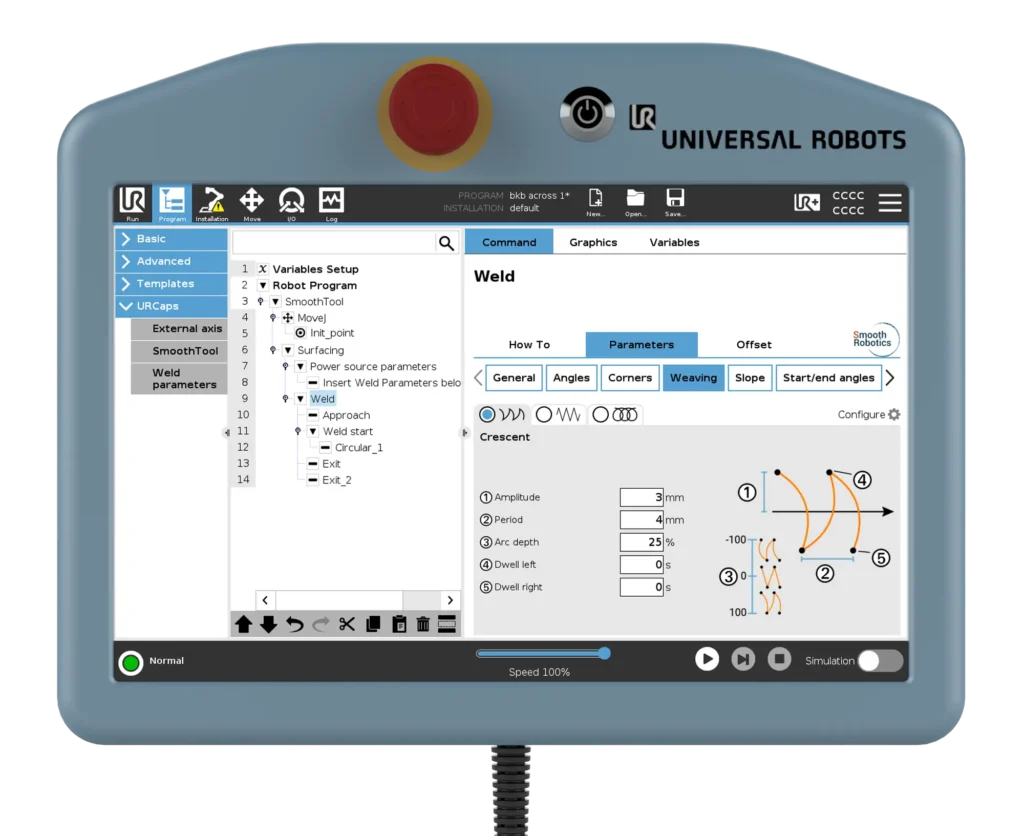
A fabricator is preparing a vertical up weld on a thick steel plate with uneven joint gaps. They select a Crescent pattern with a concave shape to ensure better fill and penetration. For the cover pass, they switch to a ZigZag pattern with angled sides for a smoother finish. By tweaking arc depth and amplitude, they get a consistent, high-quality result—without manual trial-and-error or complex programming.
5. Pro Tips & Best Practices
- The Crescent pattern offers the most flexibility—great for fine-tuned weaving
- Use Trapezoid when you want movement with dwell time but no stopping
- For surface welds, the Circle pattern often produces the cleanest results
- Try using zero arc depth in Crescent mode to create a flexible ZigZag pattern
- Remember: Back’n Forth is the simplest pattern—good for quick setups
6. How to Access This Feature in SmoothTool
You’ll find weaving options in the Parameters tab on each weld node or individual weld segment. SmoothTool provides three weaving slots per weld, and one of these can be used for stitch welding as well.
Click the “Configure” gear icon on the right side of the screen to customize which weaving options appear in your interface.
7. Why It Matters
Weaving takes your welds to the next level—ensuring strength, coverage, and consistency across challenging joints or welding positions. And with SmoothTool’s user-friendly design, it’s never been easier to apply and fine-tune complex weaving patterns right from the robot interface.
👉 Want help setting up weaving on your application? Book a demo with our team and we’ll walk you through it.