
1. What is Stitch Welding?
Stitch welding is a technique where a series of short welds are spaced out with deliberate gaps—for example, 3 cm of weld followed by 3 cm of air. This method reduces heat input into the workpiece, helping to minimize distortion and shrinkage, while also decreasing the size of the Heat Affected Zone (HAZ).
It’s especially useful in applications where thermal control is critical, such as in thin materials, galvanized parts, or assemblies with tight tolerances. Although it may result in slightly lower joint strength and could introduce risk of crevice corrosion in the gaps, stitch welding remains a valuable tool for many industrial welding tasks.
2. Core Functionality
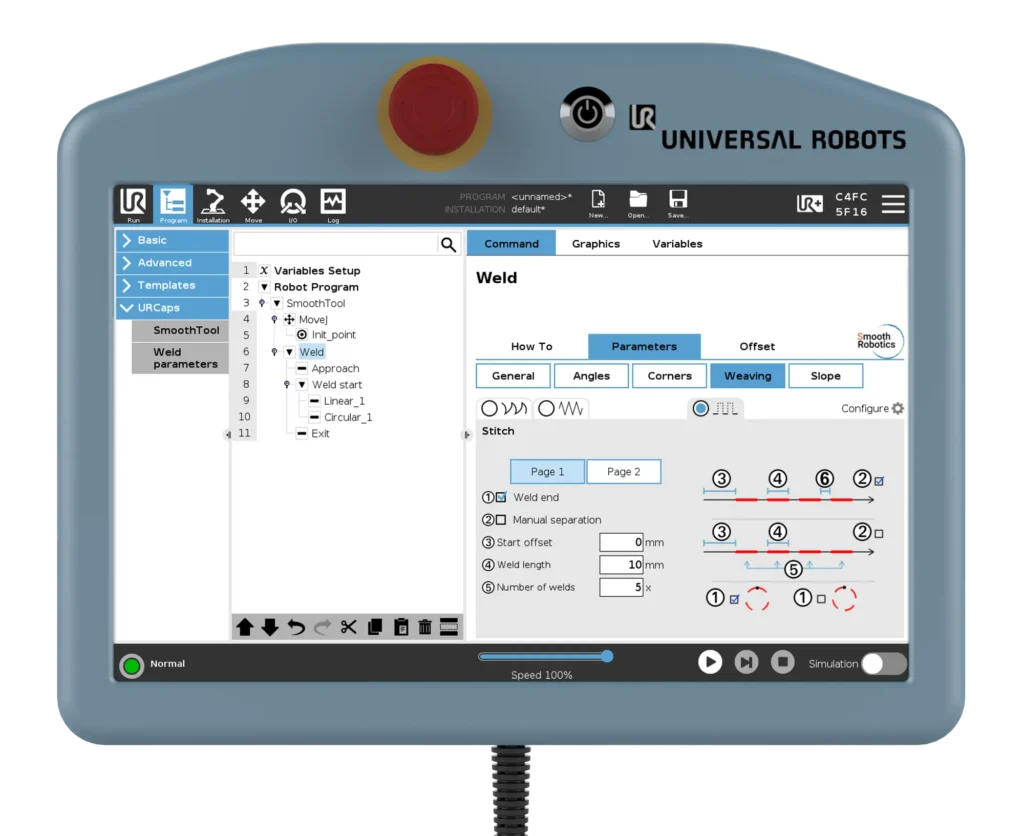
SmoothTool provides powerful and flexible control over stitch welding through its Stitch Pattern, available under the Weaving settings in the Parameters tab. It can be applied either to the full weld node or to individual segments (linear or circular).
Here’s what you can control in the Stitch Pattern setup:
- Weld End: Decide whether the stitch pattern should end with a weld or a gap.
- Manual Separation: Enable this to define custom distances between welds. Disables automatic distribution.
- Start Offset: Start with a gap instead of a weld—helpful when welding symmetrical parts or avoiding weld overlap.
- Weld Length: Define the length of each individual weld segment.
- Number of Welds: Specify how many stitches to create (only available when manual separation is off).
- Separation Distance: Define the gap length between welds (only available with manual separation).
- Airspeed: Control the robot’s speed during non-welding moves (gaps).
- Retraction: Set how far the torch should retract between each stitch—important for avoiding overheating or arc starts too close to material.
- Allow Merge: Determines whether the stitch pattern is applied over an entire continuous path (merged segments) or separately to each segment.
3. Key Benefits
- 🔥 Heat Control: Reduce distortion and shrinkage by cutting heat input by half.
- ⏱️ Faster Cycle Times: Skip unnecessary weld length, saving time and material.
- 💰 Material Savings: Less filler metal and shielding gas used per weld.
- 🧠 Intelligent Programming: Fine control over airspeed, retraction, and stitch spacing makes it easier to match welding specs exactly.
- 🔧 Adaptability: Perfect for thin materials, galvanized metals, or applications where full weld strength is not required.
4. Use Case Example
A manufacturer of lightweight enclosures uses thin-gauge steel for its products. Full-length welds previously caused warping, requiring costly rework.
By switching to Stitch Welding using SmoothTool, the manufacturer applies a 4 cm weld followed by a 4 cm gap pattern along panel edges.
The Start Offset and Manual Separation options let them alternate stitch placements across opposite panel seams—ensuring better stress distribution while eliminating distortion. The airspeed and retraction settings are optimized for speed without compromising quality, and the result is consistent welds and drastically reduced scrap.
5. Pro Tips & Best Practices
- Use Start Offset to stagger stitch patterns across symmetrical welds.
- Try enabling Allow Merge when stitching over continuous corners or edges.
- Adjust Retraction and Airspeed to balance between torch cooling and program speed.
- If crevice corrosion is a concern, ensure welds are properly sealed or coated afterward.
- Use Manual Separation for precise control when working on visible or aesthetic welds.
6. How to Access This Feature in SmoothTool
To use Stitch Welding in SmoothTool:
- Go to a Weld node or select a segment inside it.
- In the Parameters tab, scroll down to the Weaving section.
- Tap the Stitch radio button. If you don’t see Stitch as an option:
- Tap the Configure icon next to the weaving patterns.
- Add Stitch to one of your three selectable weaving options.
- Once selected, the Stitch tab will open with all available parameters.
Note: Stitch Welding is not a standalone node. It must be applied as a Weaving Pattern within a Weld node or segment.
7. Why It Matters
Stitch welding is more than just a pattern—it’s a productivity tool. With SmoothTool’s Stitch feature, users can fine-tune every parameter to perfectly match project requirements.
Whether it’s heat-sensitive parts or aesthetic welds on visible surfaces, this feature empowers welders to reduce defects, increase speed, and maintain consistent quality—directly from the robot interface, with minimal setup.