
1. What is the Weld Profile System?
The Weld Profile system in SmoothTool is designed to eliminate repetitive setup tasks and ensure consistent welding performance across jobs, operators, and shifts. With this feature, you can create a library of reusable welding presets and apply them instantly to new welds—whether linear or circular. You can even designate a default profile, so every new weld starts with your preferred settings.
By giving users the ability to standardize their welding parameters, the Weld Profile system streamlines programming, reduces the chance of errors, and significantly improves workflow efficiency.
2. Core Functionality
- Save and Reuse Profiles: Store weld parameters (speed, blend, angles, weave settings, etc.) as named profiles.
- Add Comments for Clarity: Annotate profiles with helpful notes about material types, weld positions, or use cases.
- Set a Default Profile: Choose a go-to profile that automatically applies to all new welds.
- Update and Manage: Edit, rename, or remove profiles to keep your library relevant and organized.
3. Key Benefits
- Saves Time: Avoid re-entering the same parameters for every job—just select a saved profile.
- Reduces Errors: Consistent settings reduce human error and setup variations.
- Boosts Team Efficiency: Operators across different shifts or skill levels can follow the same standards.
- Improves Weld Quality: Standardization helps ensure repeatable, high-quality results.
- Ideal for High-Mix, Low-Volume Production: Switch quickly between different weld setups without losing accuracy or time.
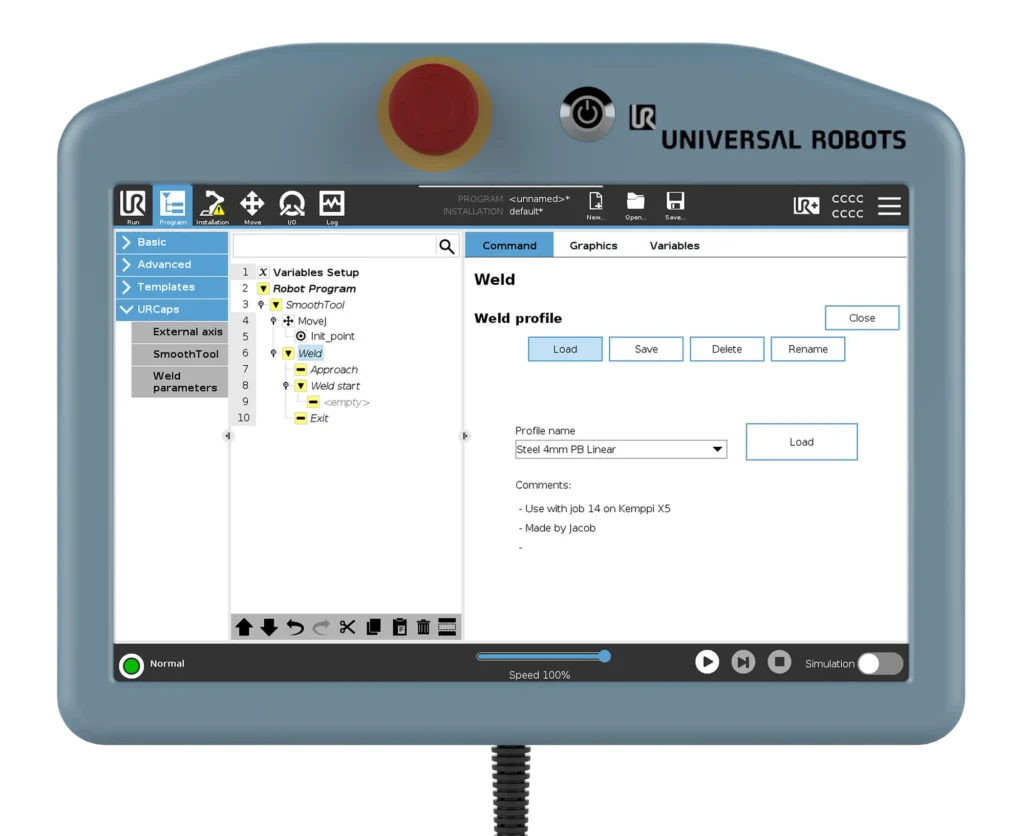
4. Use Case Example
A metal fabrication company handles custom orders daily, including parts made from different thicknesses of steel and stainless steel. Each type of weld requires slightly different parameters. Rather than adjusting settings every time, the team sets up a collection of weld profiles labeled with names like “Steel 4mm PB Linear,” “Stainless Circular PB 3mm,” and so on.
Now, when a new weld is added, the correct profile is selected (or applied by default), and the operator can focus on positioning and sequence—knowing that the weld settings are already spot on. This not only saves time but also ensures consistent quality across batches and operators.
5. Pro Tips & Best Practices
- Name Clearly: Use clear and descriptive names like “Aluminum_2mm_corner_weld” to make profiles easy to find.
- Add Comments: Use the comment section to explain when and why to use a profile—especially useful for training or shift handovers.
- Review Regularly: As your processes evolve, update your profiles to reflect the best-known settings.
- Set Your Default Wisely: Choose a profile that fits your most common job type to maximize time saved.
6. How to Access This Feature in SmoothTool
- Go to any weld node in the program tree (linear or circular).
- In the Parameters tab, adjust parameters as needed.
- Click Save as Profile to store the current settings.
- Use the Profile Selector dropdown to apply saved profiles.
- Click the star icon next to any profile to set it as your default for new welds.
7. Why It Matters
Welding consistency is key to quality and productivity. The Weld Profile system helps your team maintain that consistency while speeding up the setup process and reducing chances for manual errors.
Whether you’re producing batches or handling one-off jobs, this feature lets you focus on weld execution—not parameter entry.